Cleaning Planner - Daily KDP Interior: A Practical Guide to Quality and Customization
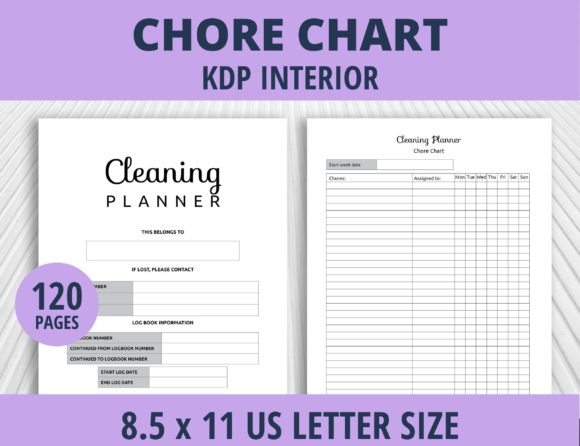
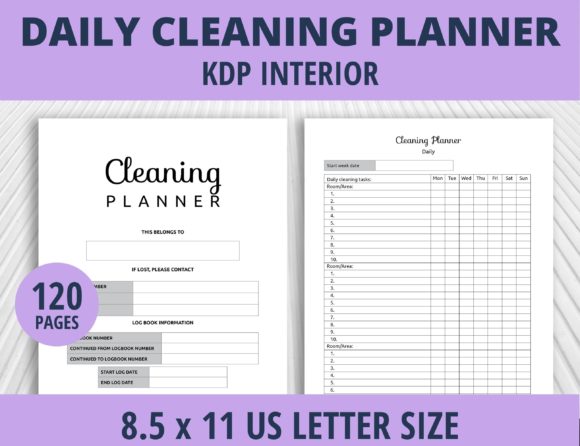
Creating a successful low-content book on Amazon KDP requires more than just uploading a generic template; it demands a strategic approach to interior design that balances usability with production quality. The Cleaning Planner - Daily KDP Interior serves as a foundational tool for publishers targeting the home organization niche, offering a structured 120-page layout designed specifically for daily maintenance tracking. However, possessing the file is only the first step. Many creators overlook the technical nuances of file formats, trim size adjustments, and content integration, leading to books that look unprofessional or fail to meet customer expectations. Understanding how to properly leverage the editable EPS source files, high-quality JPGs, and print-ready PDFs is essential for transforming this asset into a competitive product.
Understanding the Asset Package and File Hierarchy
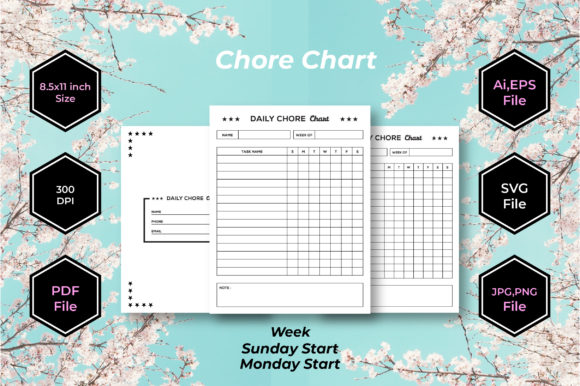
A common misunderstanding among new KDP publishers is treating all included files as equal. When you acquire a Cleaning Planner - Daily KDP Interior, you typically receive three distinct file types: an editable source file (EPS), a high-resolution JPG, and a pre-formatted 8.5 x 11 inch PDF. Each serves a specific purpose in your publishing workflow, and misusing them is a frequent cause of poor print quality.
The PDF file is often viewed as the "ready-to-go" option, but it should only be used if you intend to publish at the exact 8.5 x 11 inch trim size without any modifications. If your goal is to create a smaller 6x9 planner or a square 8x8 journal, using the static PDF will result in scaling issues where margins become inconsistent or text becomes illegible. In these scenarios, the editable source file EPS is mandatory. This vector-based format allows you to resize the interior to your desired trim size while maintaining crisp lines and professional typography. Relying solely on the JPG for resizing is another critical error; raster images lose clarity when scaled up and can appear pixelated in print, whereas vectors remain sharp at any dimension.
The Risks of Ignoring Bleed and Margin Safety
Even when using the correct source files, technical formatting errors can ruin a cleaning planner. These books rely heavily on writing space, checkboxes, and tracking tables, all of which must align perfectly with the physical binding. A frequent oversight is failing to adjust margins after resizing the Cleaning Planner - Daily KDP Interior. When you change a document from 8.5 x 11 to a smaller size, the gutter margin (the inner space near the spine) must be recalculated. If the original template had a 0.75-inch gutter for a large format, that same measurement might be excessive for a compact planner, eating into valuable writing space. Conversely, reducing margins too aggressively can cause content to disappear into the binding crease.
Always verify the safe zone requirements for your specific page count before finalizing your interior. A 120-page book has different gutter requirements than a 300-page volume. Publishers who skip this verification step often receive proofs where the daily checklist headers are cut off or the notes section is too close to the spine to write in comfortably. Utilizing the EPS file allows you to set master pages with dynamic margins that automatically adjust to your chosen trim size, preventing these costly reprints and negative reviews.
Strategic Integration vs. Standalone Publishing
One of the most significant advantages of this asset is its versatility: it can be used as-is or put together with other KDP interiors. However, many creators miss the opportunity to add value by simply publishing the 120 pages exactly as provided. While a standalone daily cleaning tracker is functional, the market is saturated with identical layouts. To differentiate your product, consider how this planner interacts with complementary content.
For example, combining the Cleaning Planner - Daily KDP Interior with a monthly calendar, a decluttering challenge tracker, or a seasonal deep-cleaning checklist creates a comprehensive home management system rather than a single-use notebook. When merging files, consistency is paramount. A jarring transition between two different interior styles signals a lack of professionalism. Ensure that fonts, line weights, and header designs match across all combined sections. Because you have access to the editable source files, you can modify the cleaning planner’s aesthetic to harmonize with other interiors you own, creating a cohesive brand experience for the user.
Evaluating Usability Before Publication
Before listing your book, conduct a practical usability audit. It is easy to assume that because a template looks good on screen, it will function well in print. This assumption is dangerous. Print out a sample spread of the Cleaning Planner - Daily KDP Interior at actual size and test it with real pens and markers. Check if the writing lines are spaced appropriately for handwriting or if they are too cramped. Verify that the checkboxes are large enough to be ticked easily but not so large that they waste space.
Paper quality on KDP standard color or black-and-white stock varies, and ink bleed-through is a legitimate concern for planners. If the interior uses heavy solid black fills or dense shading, test whether it transfers to the reverse side. You may need to lighten certain design elements in the EPS file to ensure a clean user experience. This hands-on testing phase separates high-quality publishers from those who flood the marketplace with untested products. Remember that customers buying a cleaning planner expect a functional tool, not just a decorative object. Your attention to these tactile details directly influences satisfaction and repeat business.
Making Informed Decisions on Trim Size and Format
Choosing the right trim size is a strategic decision that affects both perceived value and production costs. While the default 8.5 x 11 inch format offers maximum writing space, it may not suit every target audience. Busy professionals or parents might prefer a portable 6x9 size that fits in a bag, while homeowners tackling extensive renovations might appreciate the expansive layout of a larger format. The ability to resize the Cleaning Planner - Daily KDP Interior gives you the flexibility to test multiple formats, but each requires deliberate adjustment.
When downsizing, avoid simply shrinking the entire page proportionally. This reduces font sizes and line spacing to unusable levels. Instead, use the editable source file to reflow content. You might need to reduce the number of daily tracking categories per page or split a weekly overview across two pages to maintain readability. This extra effort in the design phase pays dividends in product quality. Additionally, consider the page count implications. Resizing to a smaller format may increase your total page count if you spread content out for legibility, which impacts printing costs and royalty margins. Always calculate your break-even point after resizing to ensure the new format remains profitable.
Verifying Licensing and Commercial Rights
Finally, never assume usage rights based solely on file delivery. Before incorporating the Cleaning Planner - Daily KDP Interior into your catalog, thoroughly review the license agreement. Confirm that you have commercial rights for unlimited publications and whether attribution is required. Some licenses restrict the number of end products or prohibit combining the interior with other assets to create a new derivative work. Overlooking these legal details can lead to account suspensions or takedown notices. Responsible publishing involves respecting intellectual property and ensuring your business model is built on compliant foundations. By verifying rights upfront, you protect your investment and build a sustainable publishing portfolio.
Success with KDP interiors comes from treating templates as starting points rather than finished products. By mastering file formats, prioritizing usability testing, strategically combining content, and respecting technical specifications, you transform a basic Cleaning Planner - Daily KDP Interior into a polished, market-ready book that genuinely serves your audience. This disciplined approach not only improves individual product performance but also establishes your reputation as a quality publisher in a competitive niche.